ADVERTISEMENTREMOVE ADS
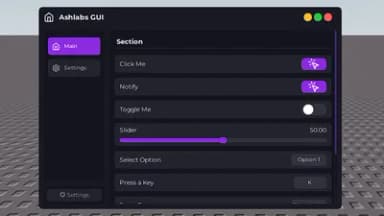
Ash-Libs | UI Library
48,223 views
Universal script•
5 months ago
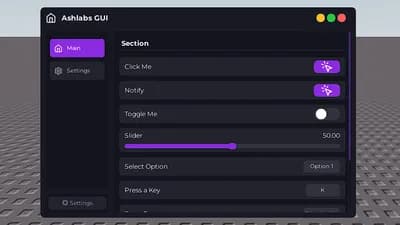
Script Preview
Description
Simple ui library for my games. chatgpt ahh ui
Features:
- Mobile Support
- Lucide Icon
- Free & Open Source
- GUI Library
ADVERTISEMENTREMOVE ADS
141 Lines • 3.79 KiB
-- https://github.com/BloodLetters/Ash-Libs
local GUI = loadstring(game:HttpGet("https://raw.githubusercontent.com/BloodLetters/Ash-Libs/refs/heads/main/source.lua"))()
GUI:CreateMain({
Name = "Ashlabs",
title = "Ashlabs GUI",
ToggleUI = "K",
WindowIcon = "home", -- you can use lucid icons
-- WindowHeight = 600, -- default height
-- WindowWidth = 800, -- default width
Theme = {
Background = Color3.fromRGB(25, 25, 35),
Secondary = Color3.fromRGB(35, 35, 45),
Accent = Color3.fromRGB(138, 43, 226),
Text = Color3.fromRGB(255, 255, 255),
TextSecondary = Color3.fromRGB(180, 180, 180),
Border = Color3.fromRGB(50, 50, 60),
NavBackground = Color3.fromRGB(20, 20, 30)
},
Blur = { -- Buggy
Enable = false, -- transparent option
value = 0.2
},
Config = { -- not implemented yet
Enabled = false,
}
})
local main = GUI:CreateTab("Main", "home") -- You can use IconID we didnt impleemnt lucid or any external icons
GUI:CreateSection({
parent = main,
text = "Section"
})
GUI:CreateButton({
parent = main,
text = "Click Me",
callback = function()
GUI:CreateNotify({title = "Button Clicked", description = "You clicked the button!"})
end
})
GUI:CreateButton({
parent = main,
text = "Notify",
callback = function()
GUI:CreateNotify({title = "Welcome", description = "Welcome to the Ashlabs GUI! This is a notification exampled. You can use this to inform users about important events or actions. You can customize the title and description to fit your needs. description can be multiple lines long and will adjust its size based on the content."})
end
})
GUI:CreateToggle({
parent = main,
text = "Toggle Me",
default = false,
callback = function(state)
print("Toggle state:", state)
end
})
GUI:CreateSlider({
parent = main,
text = "Slider",
min = 0,
max = 100,
default = 50,
function(value)
print("Slider value changed:", value)
end
})
GUI:CreateDropdown({
parent = main,
text = "Select Option",
options = {"Option 1", "Option 2", "Option 3"},
callback = function(selected)
print("Selected option:", selected)
end
})
GUI:CreateKeyBind({
parent = main,
text = "Press a Key",
default = "K",
callback = function(key, input, isPressed)
if isPressed then
print("Key pressed:", key)
else
print("Key released:", key)
end
end
})
GUI:CreateInput({
parent = main,
text = "Enter Text",
placeholder = "Placeholder",
callback = function(text)
print("Input text:", text)
end
})
GUI:CreateParagraph({
parent = main,
text = "This is a paragraph explaining something important. It can be multiple lines long and will adjust its size based on the content."
})
GUI:CreateColorPicker({
parent = main,
text = "Pick a Color",
default = Color3.fromRGB(255, 0, 0),
callback = function(color)
print("Selected color:", color)
end
})
local settings = GUI:CreateTab("Settings", "settings")
GUI:CreateSection({
parent = settings,
text = "Settings Section"
})
GUI:CreateButton({
parent = settings,
text = "Reset Settings",
callback = function()
GUI:CreateNotify({ title = "Settings Reset", text = "All settings have been reset to default."})
end
})
GUI:CreateDivider({
parent = settings
})
GUI:CreateButton({
parent = settings,
text = "Reset 2",
callback = function()
GUI:CreateNotify({ title = "Settings Reset", text = "All settings have been reset to default."})
end
})
ADVERTISEMENTREMOVE ADS
ADVERTISEMENTREMOVE ADS


Comments
sexy ui lib would use if i exploited
@HannaeAltae thanks
Hi Nice UI
@modMenuWITHTIGERx thanks
You should add a 'MultipleOptions = true' setting to the dropdown, which allows users to select multiple options at once. Love the design otherwise!
@Wolfy thanks. I will add it in the next update.
thats the thing i needed
Great ahh Gui Love it! can i use it?