ADVERTISEMENTREMOVE ADS
FOV Changer GUI (2025)
41,003 views
Universal script•
1 month ago
Script Preview
Description
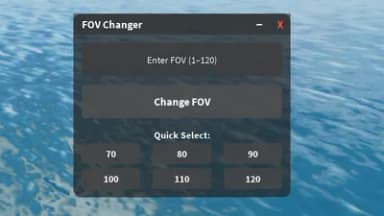
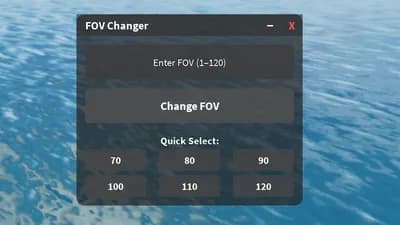
FOV Changer GUI (Universal Script) new with minimize, close, and quick action buttons.
ADVERTISEMENTREMOVE ADS
181 Lines • 5.76 KiB
-- Create ScreenGui
local screenGui = Instance.new("ScreenGui")
screenGui.Name = "FOVChanger"
screenGui.ResetOnSpawn = false
screenGui.Parent = game.Players.LocalPlayer:WaitForChild("PlayerGui")
-- Create main Frame
local frame = Instance.new("Frame")
frame.Size = UDim2.new(0, 260, 0, 220)
frame.Position = UDim2.new(0.5, -130, 0.5, -110)
frame.BackgroundColor3 = Color3.fromRGB(35, 35, 35)
frame.BackgroundTransparency = 0.3 -- 30% transparent
frame.BorderSizePixel = 0
frame.Active = true
frame.Draggable = true
frame.Parent = screenGui
local corner = Instance.new("UICorner")
corner.CornerRadius = UDim.new(0, 10)
corner.Parent = frame
-- Title Bar
local titleBar = Instance.new("Frame")
titleBar.Size = UDim2.new(1, 0, 0, 25)
titleBar.BackgroundColor3 = Color3.fromRGB(45, 45, 45)
titleBar.BackgroundTransparency = 0.4 -- slightly see-through
titleBar.BorderSizePixel = 0
titleBar.Parent = frame
local title = Instance.new("TextLabel")
title.Size = UDim2.new(1, -60, 1, 0)
title.Position = UDim2.new(0, 10, 0, 0)
title.Text = "FOV Changer"
title.TextColor3 = Color3.fromRGB(255, 255, 255)
title.TextStrokeTransparency = 0.8
title.TextXAlignment = Enum.TextXAlignment.Left
title.BackgroundTransparency = 1
title.Font = Enum.Font.SourceSansBold
title.TextSize = 16
title.Parent = titleBar
-- Close button
local closeButton = Instance.new("TextButton")
closeButton.Size = UDim2.new(0, 25, 0, 25)
closeButton.Position = UDim2.new(1, -25, 0, 0)
closeButton.Text = "X"
closeButton.TextColor3 = Color3.fromRGB(255, 80, 80)
closeButton.Font = Enum.Font.SourceSansBold
closeButton.TextSize = 16
closeButton.BackgroundTransparency = 1
closeButton.Parent = titleBar
-- Minimize button
local minimizeButton = Instance.new("TextButton")
minimizeButton.Size = UDim2.new(0, 25, 0, 25)
minimizeButton.Position = UDim2.new(1, -50, -0.25, 0)
minimizeButton.Text = "_"
minimizeButton.TextColor3 = Color3.fromRGB(255, 255, 255)
minimizeButton.Font = Enum.Font.SourceSansBold
minimizeButton.TextSize = 18
minimizeButton.BackgroundTransparency = 1
minimizeButton.Parent = titleBar
-- Content container
local content = Instance.new("Frame")
content.Size = UDim2.new(1, 0, 1, -25)
content.Position = UDim2.new(0, 0, 0, 25)
content.BackgroundTransparency = 1
content.Parent = frame
-- TextBox input
local textBox = Instance.new("TextBox")
textBox.Size = UDim2.new(1, -20, 0, 40)
textBox.Position = UDim2.new(0, 10, 0, 10)
textBox.Text = "Enter FOV (1–120)"
textBox.TextColor3 = Color3.fromRGB(255, 255, 255)
textBox.TextStrokeTransparency = 0.8
textBox.BackgroundColor3 = Color3.fromRGB(60, 60, 60)
textBox.BackgroundTransparency = 0.2
textBox.ClearTextOnFocus = true
textBox.Font = Enum.Font.SourceSans
textBox.TextSize = 14
textBox.Parent = content
local tbCorner = Instance.new("UICorner")
tbCorner.CornerRadius = UDim.new(0, 5)
tbCorner.Parent = textBox
-- Apply button
local button = Instance.new("TextButton")
button.Size = UDim2.new(1, -20, 0, 40)
button.Position = UDim2.new(0, 10, 0, 60)
button.Text = "Change FOV"
button.TextColor3 = Color3.fromRGB(255, 255, 255)
button.BackgroundColor3 = Color3.fromRGB(80, 80, 80)
button.BackgroundTransparency = 0.2
button.Font = Enum.Font.SourceSansBold
button.TextSize = 16
button.Parent = content
local btnCorner = Instance.new("UICorner")
btnCorner.CornerRadius = UDim.new(0, 5)
btnCorner.Parent = button
-- Quick-select label
local quickLabel = Instance.new("TextLabel")
quickLabel.Size = UDim2.new(1, 0, 0, 20)
quickLabel.Position = UDim2.new(0, 0, 0, 110)
quickLabel.Text = "Quick Select:"
quickLabel.TextColor3 = Color3.fromRGB(255, 255, 255)
quickLabel.TextStrokeTransparency = 0.8
quickLabel.BackgroundTransparency = 1
quickLabel.TextSize = 14
quickLabel.Font = Enum.Font.SourceSansBold
quickLabel.Parent = content
-- Quick-select container
local quickContainer = Instance.new("Frame")
quickContainer.Size = UDim2.new(1, 0, 0, 60)
quickContainer.Position = UDim2.new(0, 0, 0, 130)
quickContainer.BackgroundTransparency = 1
quickContainer.Parent = content
-- Quick-select FOV buttons
local fovValues = {70, 80, 90, 100, 110, 120}
for i, val in ipairs(fovValues) do
local btn = Instance.new("TextButton")
btn.Size = UDim2.new(0, 70, 0, 25)
btn.Position = UDim2.new(0, ((i - 1) % 3) * 85 + 10, 0, math.floor((i - 1) / 3) * 30)
btn.Text = tostring(val)
btn.TextColor3 = Color3.new(1, 1, 1)
btn.BackgroundColor3 = Color3.fromRGB(70, 70, 70)
btn.BackgroundTransparency = 0.2
btn.Font = Enum.Font.SourceSansBold
btn.TextSize = 14
btn.Parent = quickContainer
local qCorner = Instance.new("UICorner")
qCorner.CornerRadius = UDim.new(0, 4)
qCorner.Parent = btn
btn.MouseButton1Click:Connect(function()
game.Workspace.CurrentCamera.FieldOfView = val
textBox.Text = "FOV set to " .. val
end)
end
-- Function to change FOV via input
local function changeFOV()
local input = tonumber(textBox.Text)
if input and input >= 1 and input <= 120 then
game.Workspace.CurrentCamera.FieldOfView = input
textBox.Text = "FOV set to " .. input
else
textBox.Text = "Invalid FOV! (1–120)"
end
end
button.MouseButton1Click:Connect(changeFOV)
-- Minimize functionality
local minimized = false
minimizeButton.MouseButton1Click:Connect(function()
minimized = not minimized
if minimized then
-- Hide content first, then resize frame
content.Visible = false
frame:TweenSize(UDim2.new(0, 260, 0, 25), "Out", "Quad", 0.3, true)
else
-- Show frame first, then show content
frame:TweenSize(UDim2.new(0, 260, 0, 220), "Out", "Quad", 0.3, true)
task.wait(0.3)
content.Visible = true
content:TweenSize(UDim2.new(1, 0, 1, -25), "Out", "Quad", 0.2, true)
end
end)
-- Close functionality
closeButton.MouseButton1Click:Connect(function()
screenGui:Destroy()
end)
ADVERTISEMENTREMOVE ADS
ADVERTISEMENTREMOVE ADS


Comments