ADVERTISEMENTREMOVE ADS
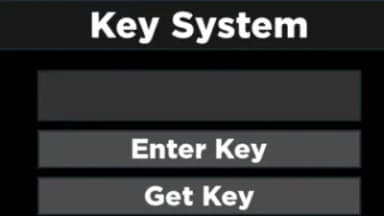
Simple key system
47,447 views
Universal script•
7 months ago
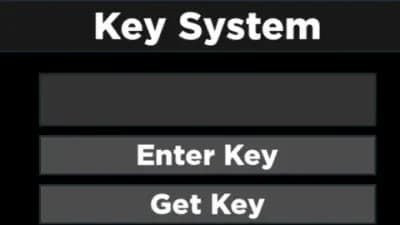
Script Preview
Description
Things to know about it:
#1. if entered the wrong key it'll send a roblox notif basically the user they entered the wrong key
#2. If the right key is entered & the script didn't load it will send a roblox notification that'll tell you to check console for errors.
#3. If you don't wanna use http then just replace it with your entire script.
#4. It can be dragged by the top part
ADVERTISEMENTREMOVE ADS
115 Lines • 3.71 KiB
local screenGui = Instance.new("ScreenGui")
screenGui.Parent = game.Players.LocalPlayer:WaitForChild("PlayerGui")
local frame = Instance.new("Frame")
frame.Size = UDim2.new(0.3, 0, 0.4, 0)
frame.Position = UDim2.new(0.35, 0, 0.3, 0)
frame.BackgroundColor3 = Color3.new(0, 0, 0)
frame.Parent = screenGui
local title = Instance.new("TextLabel")
title.Size = UDim2.new(1, 0, 0.2, 0)
title.Position = UDim2.new(0, 0, 0, 0)
title.BackgroundColor3 = Color3.new(0.1, 0.1, 0.1)
title.Text = "Key System"
title.TextColor3 = Color3.new(1, 1, 1)
title.Font = Enum.Font.GothamBlack
title.TextSize = 24
title.Parent = frame
local textBox = Instance.new("TextBox")
textBox.Size = UDim2.new(0.8, 0, 0.2, 0)
textBox.Position = UDim2.new(0.1, 0, 0.3, 0)
textBox.BackgroundColor3 = Color3.new(0.2, 0.2, 0.2)
textBox.Text = ""
textBox.TextColor3 = Color3.new(1, 1, 1)
textBox.Font = Enum.Font.GothamBlack
textBox.TextSize = 18
textBox.Parent = frame
local enterKeyButton = Instance.new("TextButton")
enterKeyButton.Size = UDim2.new(0.8, 0, 0.15, 0)
enterKeyButton.Position = UDim2.new(0.1, 0, 0.55, 0)
enterKeyButton.BackgroundColor3 = Color3.new(0.3, 0.3, 0.3)
enterKeyButton.Text = "Enter Key"
enterKeyButton.TextColor3 = Color3.new(1, 1, 1)
enterKeyButton.Font = Enum.Font.GothamBlack
enterKeyButton.TextSize = 18
enterKeyButton.Parent = frame
local getKeyButton = Instance.new("TextButton")
getKeyButton.Size = UDim2.new(0.8, 0, 0.15, 0)
getKeyButton.Position = UDim2.new(0.1, 0, 0.75, 0)
getKeyButton.BackgroundColor3 = Color3.new(0.3, 0.3, 0.3)
getKeyButton.Text = "Get Key"
getKeyButton.TextColor3 = Color3.new(1, 1, 1)
getKeyButton.Font = Enum.Font.GothamBlack
getKeyButton.TextSize = 18
getKeyButton.Parent = frame
local function setClipboardWithURL()
setclipboard("keysitehere")
end
getKeyButton.MouseButton1Click:Connect(setClipboardWithURL)
local function sendNotification(title, text, duration)
game.StarterGui:SetCore("SendNotification", {
Title = title;
Text = text;
Duration = duration;
})
end
local function enterKey()
local userInputKey = textBox.Text
local correctKey = "keyhere"
if userInputKey == correctKey then
local scriptURL = "scriptlink"
local success, result = pcall(function()
return loadstring(game:HttpGet(scriptURL))()
end)
if success then
screenGui:Destroy()
else
sendNotification("Error", "Failed to load script. Check the console for details.", 10)
end
else
sendNotification("Wrong Key", "You entered the wrong key!", 10)
end
end
enterKeyButton.MouseButton1Click:Connect(enterKey)
local dragging, dragInput, dragStart, startPos
local function update(input)
local delta = input.Position - dragStart
frame.Position = UDim2.new(startPos.X.Scale, startPos.X.Offset + delta.X, startPos.Y.Scale, startPos.Y.Offset + delta.Y)
end
title.InputBegan:Connect(function(input)
if input.UserInputType == Enum.UserInputType.MouseButton1 or input.UserInputType == Enum.UserInputType.Touch then
dragging, dragStart, startPos = true, input.Position, frame.Position
input.Changed:Connect(function()
if input.UserInputState == Enum.UserInputState.End then
dragging = false
end
end)
end
end)
title.InputChanged:Connect(function(input)
if input.UserInputType == Enum.UserInputType.MouseMovement or input.UserInputType == Enum.UserInputType.Touch then
dragInput = input
end
end)
game:GetService("UserInputService").InputChanged:Connect(function(input)
if dragging and input == dragInput then
update(input)
end
end)
ADVERTISEMENTREMOVE ADS
ADVERTISEMENTREMOVE ADS


Comments
Thanks! I think I can use it in my next scripts
Yo, can u add a whole system with like keyguardian or platoboost or keyrblx
@xcopium idk how to do that
@xcopium Feel free to check out the one on my profile, we're embedding the whitelist instead 🤠
ty but I think need x button(remove gui)
@user1572 not my script