ADVERTISEMENTREMOVE ADS
Tool modifier GUI
6 views
Universal script•
1 month ago
Script Preview
Description
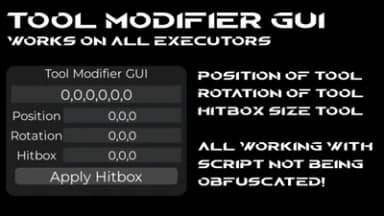
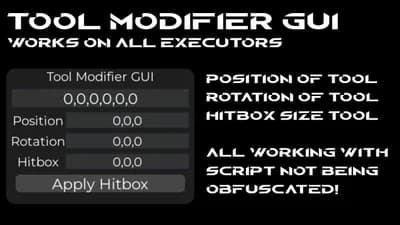
1 Input X,Y,Z,RX,RY,RZ
2 Input X,Y,Z
3 input RX,RY,RZ
4 input HX,HY,HZ
It shows a green outline on the hitbox of ur tool and click apply if you want the hitbox to work
Hitbox is H btw
Rotation is R btw
Features:
- Free
- Keyless
- Simple
- Draggable
- GUI
- DraggableGUI
- ToolPosition
- ToolRotation
- FE
- Bypass
- Updated
- Unpatched
- Not clickbait
- Work on all servers
- Useful
- Script
- Best Scripts
- Modifier
- Changer
 Solara
 Cryptic
 Wave
Wave Codex
Codex Celery
 Delta
Delta Trigon Evo
 Macsploit
 Synapse Z
 AWP.GG
 Cryptic Windows
 Xeno
Xeno Illusion
 Potassium
 Valex
Valex Seliware
ADVERTISEMENTREMOVE ADS
169 Lines • 5.46 KiB
local player = game.Players.LocalPlayer
local playerGui = player:WaitForChild("PlayerGui")
-- ScreenGui
local gui = Instance.new("ScreenGui")
gui.Name = "ToolGripGUI"
gui.ResetOnSpawn = false
gui.Parent = playerGui
-- Frame
local frame = Instance.new("Frame")
frame.Size = UDim2.new(0, 320, 0, 230)
frame.Position = UDim2.new(0.8, 0, 0.7, 0)
frame.BackgroundColor3 = Color3.fromRGB(30, 30, 30)
frame.BorderSizePixel = 0
frame.Parent = gui
local corner = Instance.new("UICorner")
corner.CornerRadius = UDim.new(0, 16)
corner.Parent = frame
-- Title
local title = Instance.new("TextLabel")
title.Size = UDim2.new(1, 0, 0, 25)
title.BackgroundTransparency = 1
title.Text = "Tool Grip + Hitbox Editor"
title.TextColor3 = Color3.fromRGB(255,255,255)
title.TextScaled = true
title.Font = Enum.Font.Gotham
title.Parent = frame
-- Main textbox (Grip)
local fullBox = Instance.new("TextBox")
fullBox.Size = UDim2.new(1, -20, 0, 30)
fullBox.Position = UDim2.new(0, 10, 0, 35)
fullBox.BackgroundColor3 = Color3.fromRGB(50,50,50)
fullBox.TextColor3 = Color3.fromRGB(255,255,255)
fullBox.TextScaled = true
fullBox.Font = Enum.Font.Gotham
fullBox.ClearTextOnFocus = false
fullBox.Text = "0,0,0,0,0,0"
fullBox.Parent = frame
-- Small textboxes
local function createBox(labelText, posY)
local label = Instance.new("TextLabel")
label.Size = UDim2.new(0.3, 0, 0, 25)
label.Position = UDim2.new(0.02, 0, 0, posY)
label.BackgroundTransparency = 1
label.Text = labelText
label.TextColor3 = Color3.fromRGB(255,255,255)
label.TextScaled = true
label.Font = Enum.Font.Gotham
label.Parent = frame
local box = Instance.new("TextBox")
box.Size = UDim2.new(0.65, 0, 0, 25)
box.Position = UDim2.new(0.32, 0, 0, posY)
box.BackgroundColor3 = Color3.fromRGB(50,50,50)
box.TextColor3 = Color3.fromRGB(255,255,255)
box.TextScaled = true
box.Font = Enum.Font.Gotham
box.ClearTextOnFocus = false
box.Text = "0,0,0"
box.Parent = frame
return box
end
local posBox = createBox("Position (X,Y,Z)", 75)
local rotBox = createBox("Rotation (RX,RY,RZ)", 110)
local hitBox = createBox("Hitbox (HX,HY,HZ)", 145)
-- Make GUI draggable
local dragging, dragStart, startPos
local uis = game:GetService("UserInputService")
frame.InputBegan:Connect(function(input)
if input.UserInputType == Enum.UserInputType.MouseButton1 then
dragging = true
dragStart = input.Position
startPos = frame.Position
input.Changed:Connect(function()
if input.UserInputState == Enum.UserInputState.End then dragging = false end
end)
end
end)
uis.InputChanged:Connect(function(input)
if dragging and input.UserInputType == Enum.UserInputType.MouseMovement then
local delta = input.Position - dragStart
frame.Position = UDim2.new(startPos.X.Scale, startPos.X.Offset + delta.X,
startPos.Y.Scale, startPos.Y.Offset + delta.Y)
end
end)
-- Function to update tool grip
local function updateTool()
local char = player.Character
if not char then return end
local tool = char:FindFirstChildOfClass("Tool")
if not tool or not tool:FindFirstChild("Handle") then return end
local handle = tool.Handle
local px,py,pz = posBox.Text:match("([^,]+),([^,]+),([^,]+)")
local rx,ry,rz = rotBox.Text:match("([^,]+),([^,]+),([^,]+)")
px,py,pz = tonumber(px) or 0, tonumber(py) or 0, tonumber(pz) or 0
rx,ry,rz = math.rad(tonumber(rx) or 0), math.rad(tonumber(ry) or 0), math.rad(tonumber(rz) or 0)
tool.Grip = CFrame.new(px,py,pz) * CFrame.Angles(rx,ry,rz)
fullBox.Text = string.format("%s,%s,%s,%s,%s,%s", px,py,pz, math.deg(rx), math.deg(ry), math.deg(rz))
end
fullBox.FocusLost:Connect(updateTool)
posBox.FocusLost:Connect(updateTool)
rotBox.FocusLost:Connect(updateTool)
-- HITBOX BUTTON
local hitboxButton = Instance.new("TextButton")
hitboxButton.Size = UDim2.new(0.9, 0, 0, 30)
hitboxButton.Position = UDim2.new(0.05, 0, 0, 180)
hitboxButton.BackgroundColor3 = Color3.fromRGB(70,70,70)
hitboxButton.TextColor3 = Color3.fromRGB(255,255,255)
hitboxButton.TextScaled = true
hitboxButton.Font = Enum.Font.Gotham
hitboxButton.Text = "Apply Hitbox"
hitboxButton.Parent = frame
local corner = Instance.new("UICorner")
corner.CornerRadius = UDim.new(0,8)
corner.Parent = hitboxButton
hitboxButton.MouseEnter:Connect(function() hitboxButton.BackgroundColor3 = Color3.fromRGB(90,90,90) end)
hitboxButton.MouseLeave:Connect(function() hitboxButton.BackgroundColor3 = Color3.fromRGB(70,70,70) end)
local function applyHitbox()
local char = player.Character
if not char then return end
local humanoid = char:FindFirstChildOfClass("Humanoid")
if not humanoid then return end
local tool = char:FindFirstChildOfClass("Tool")
if not tool or not tool:FindFirstChild("Handle") then return end
local handle = tool.Handle
local hx, hy, hz = hitBox.Text:match("([^,]+),([^,]+),([^,]+)")
hx, hy, hz = tonumber(hx) or 5, tonumber(hy) or 5, tonumber(hz) or 5
local oldBox = handle:FindFirstChild("SelectionBoxCreated")
if oldBox then oldBox:Destroy() end
humanoid:UnequipTools()
task.wait(0.005)
humanoid:EquipTool(tool)
handle.Size = Vector3.new(hx, hy, hz)
handle.Massless = true
handle.CanCollide = false
handle.Transparency = 0 -- tool visible
local box = Instance.new("SelectionBox")
box.Name = "SelectionBoxCreated"
box.Adornee = handle
box.Color3 = Color3.fromRGB(0,255,0)
box.LineThickness = 0.05
box.SurfaceTransparency = 1 -- only outline
box.Parent = handle
end
hitboxButton.MouseButton1Click:Connect(applyHitbox)
ADVERTISEMENTREMOVE ADS
ADVERTISEMENTREMOVE ADS
Comments